Text Widget
Lorem ipsum dolor sit amet, consectetur adipisicing elit, sed do eiusmod tempor incididunt ut labore et dolore magna aliqua. Ut enim ad minim veniam, quis nostrud exercitation test link ullamco laboris nisi ut aliquip ex ea commodo consequat.
Duis aute irure dolor in reprehenderit in voluptate another link velit esse cillum dolore eu fugiat nulla pariatur.
Sample Text
Lorem ipsum dolor sit amet, consectetur adipisicing elit, sed do eiusmod tempor incididunt ut labore et dolore magna aliqua. Ut enim ad minim veniam, quis nostrud exercitation test link ullamco laboris nisi ut aliquip ex ea commodo consequat.
You Can Also Check
"India is, the cradle of the human race, the birthplace of human speech, the mother of history, the grandmother of legend, and the great grandmother of tradition. Our most valuable and most instructive materials in the history of man are treasured up in India only." These are not our words. These are the words of the great Mark Twain. And here are 25 Indians facts to support his statement: 1. A floating post office India has the largest postal network in the world with over 1, 55,015 post offices. A single post office on an average serves a population of 7,175 people. The floating post office in Dal Lake, Srinagar, was inaugurated in August 2011. 2. Kumbh Mela gathering visible from space The 2011 Kumbh Mela was the largest gathering of people with over 75 million pilgrims. The gathering was so huge that the crowd was visible from space. 3. The wettest inhabited place in the world Mawsynram, a village on the Khasi Hills, Meghalaya, receives the highe...
Using keyboard shortcuts can greatly increase your productivity, reduce repetitive strain, and help keep you focused. For example, to copy text, you can highlight text and press the Ctrl+C shortcut. The shortcut is faster than moving your hands from the keyboard, highlighting with the mouse, choosing copy from the file menu, and then returning to the keyboard. Below are the top 10 keyboard shortcuts we recommend everyone memorize and use. Ctrl+C or Ctrl+Insert and Ctrl+X Both Ctrl+C and Ctrl+ Insert will copy highlighted text or a selected item. If you want to cut an item instead of copying it, press Ctrl+X . This action removes the text or item and stores it in the clipboard for you, rather than just copying it to the clipboard while leaving the original behind. Apple computer users can substitute the Ctrl key for the command (cmd) key on their computers. For example, pressing Cmd+C ...
Adolf Hitler is one of the most famous names you will ever hear. While worldwide he is known for his actions during World War II and the way which he treated people during this period, there is plenty that you probably never knew about this man. Here are nine unknown facts that you’ve probably never heard before – along with your chance to brush up on your history knowledge. Adolf Hitler wasn’t born in Germany. Since we associate Hitler with his leadership of Germany during the Second World War and the way which he fought so adamantly for the “pure bred” German people, it’s easy to think without consideration that he himself was born in Germany. However, he was actually born in Austria to an Austrian couple – father Alois Hitler and mother Klara Hitler. Born on April 20th, 1889, Adolf had five other siblings, although four of them died before making it to adulthood. He sustained serious injuries during World War I. He is so heavily associated with World War II that we...
Australia is a fascinating country – home to many amazing wildlife and views, with famous buildings and landmarks which plenty of travelers long to see. Whether it’s close to you or very far from home, here are some awesome facts about this incredible place. Way back in the history of Australia, indigenous people were settled on the land for around 50,000 years before the British arrived. You will find more kangaroos than you will humans! Australia is an island, and it’s a large island at that. As a result, you can visit more than 10,000 beaches across the country. Koala bears are popular in Australia, although there are 10 times as many camels than koalas. There is no Bills of Rights in this country, making it the only Western country to omit this from its governmental system. Saudi Arabia imports camels from Australia. There are so many different types of species in Australia that only 25% of them have been discovered and are known to humans. This l...
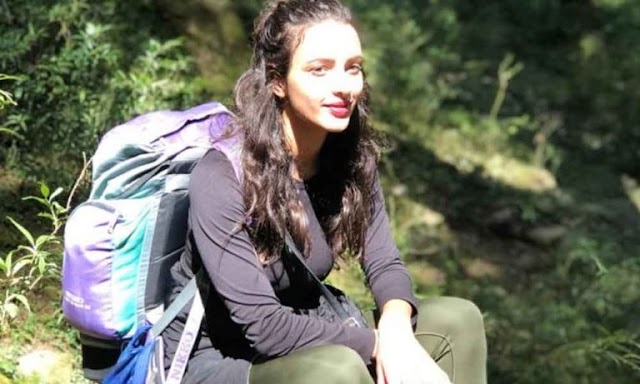
Laila Majnu actress Tripti Dimri takes a mini vacation to her hometown in Uttarakhand post her grand debut release Laila Majnu was undoubtedly one of the most talked films of the year. Bringing the epic romance back in today’s generation, the movie garnered a lot of appreciation and recognition for its lead actress Tripti Dimri. The on-screen Laila became everyone’s instant favorite with her amazing talent on screen and her beauty. She was indeed a visual treat as the serene locations of the setting added to her beauty. But did you know that the actress has a special connect with the mountains that goes beyond her debut film? Tripti hails from a small town in Uttarakhand and post her film release, she went back to her home ground to spend some quality time with her friends and family back there. The entire process of the movie release kept the beautiful actress a lot more occupied and busy, but to have her moment of peace and glory post the release, she went back to her hom...
The leader of the world’s largest democracy was selected with a huge mandate ever since the 1984 elections. Narendra Modi, the man leading 1.2 billion people is the 15th Prime Minister of India. He is also the first PM to be born in an independent India. Read on to know more of such unknown facts about Narendra Modi. #1. Starting Young Modi’s love for his country started young. During his childhood, he served as a volunteer to the India army at the railway stations during the Indo- Pak war of 1965. He also helped the flood victims in Gujarat in 1967. #2. Fashion Icon Modi’s fashion choices have always drawn media attention. It wouldn’t be wrong to say that the man himself is a fashion icon. But what many people do not know is that he is brand conscious or to be precise- he buys from a certain brand called ‘Jade Blue’ which is an Ahmedabad based textile company. #3. ...
1. Butter Chicken is one of the top orders at any Indian restaurant in the West and it is delicious. This sultry poultry dish tastes great with kaali daal (black lentils), naan, and a green salad. The daal and naan recipes are below so you can have a full, home-cooked Indian meal tonight. The best part about this recipe is that the only ingredient you may need is curry powder. Besides that, you'll need common items like olive oil, onion, garlic, ginger, butter, and tomato puree. 2. Tandoori Chicken - Next on the list is that famous Indian barbecue chicken recipe. It's hard to find anyone who doesn't fall in love with tandoori chicken. Serve this one over basmati rice tossed with turmeric and add a few slices of fresh onion for an extra kick. Once you have the basic recipe for Tandoori Masala prepare and store it so you can cook tandoori chicken anytime you feel the urge. Trust us, this will become your family's new favorite...
Parrots are definitely among the most colorful birds out there. Known for their ability to talk back and sit on pirate’s shoulders, there’s a huge variety of these intelligent birds, which also means there’s a lot to learn about them! So check out these top 30 colorful facts about parrots! It is estimated that there are about 550 wild parrots living in New York City, especially in Queens and Brooklyn. No one is one hundred percent sure how they got there, but we know it definitely was not by natural migration. The most accepted theory is that they escaped from a shipment headed to JFK Airport. There is a death metal band called Hatebeak who’s lead and only vocalist is a grey parrot named Waldo. One of the most elusive and perplexing birds in the world is the Australian Night Parrot – there were only 3 confirmed sightings in over one century. Most parrots are known for being extremely intelligent – one species in particular, the Goffin cockatoo, and solve complex mechanical ...
1. INDIAN PARLkIAMENT WAS DESIGNED BY ? Design of Indian Parliament created by 2 Britishers Sir Edwin Lutyens and Sir Herbert Baker. Both of those were also responsible for overall designing and construction of Delhi. First Foundation of Indian Parliament House laid on 12 February 1921. 2. TOOK 15 YEARS FOR CONSTRUCTION Sansad Bhavan construction started in 1912 and opened in 1927. Right now, it’s one of the most important and historical buildings of India. 83 lac price of money to get the marvellous building created. 3. INCLUDE 2 HOUSES The Parliament House or Sansad Bhavan include 2 houses, the upper House and the Lower House. The higher house is also called the Rajya Sabha or Council of States whereas Lok Sabha is also called the Lower House. The members of the Parliament are either elected by the people of India or nominated by the President of India. The legislature or Parliament headed by the President of India. The ...
With abundant historic sites, bustling markets, and endless cultural institutions, Mumbai is a city packed with places that will be rewarding for any visitor. To help you navigate the best of what this vibrant city has to offer, Culture Trip has put together a guide of 12 must-see attractions. 1. Gateway of India Commemorating the visit of King George V and Queen Mary to the city, the Gateway of India is perhaps the most known among Mumbai’s historic monuments. However, it also happens to be the spot from where the last British troops departed the country after centuries of their colonial presence. Designed by Scottish architect George Wittet, who took from Indo-Islamic, Indian and Roman influences, the structure was completed only in 1914, with its foundation stone laid in 1911. 2. Chhatrapati Shivaji Terminus As the country’s most famous railway station and one of Mumbai’s most iconic landmarks, the Chhatrapati Shivaji Terminus is one of the best spots to wi...


 Hello, my name is Jack Sparrow. I'm a 50 year old self-employed Pirate from the Caribbean.







Social Plugin